
Putting a Cap on Encaps: Taming Percentage Data with the Logit Transformation
When your designed experiments succeed a little too well, predicted percentages can creep past 100%, which is great for morale but terrible for credibility. A pharmaceutical research scientist ran into exactly this problem when fitting results for an encapsulation and asked Stat-Ease for a fix. The answer, courtesy of a chemical engineer's hard-won process development experience, involves one clever transformation and a rename button used with purpose.
Original question from a pharmaceutical research scientist:
"We usually report encapsulations (“Encaps”) in percentages. Is there a way to tell Stat-Ease software that Encaps cannot exceed 100%?"
Answer from Stat-Ease Consultant, Mark Anderson:
I came across this issue many times in my career as a chemical engineer doing process development aimed at maximizing yields. When my designed experiments succeed by pushing them up to near 100%, the confidence intervals on predicted results would range above 100%. This undermined credibility. Fortunately, Stat-Ease software provides a response transformation, called a “logit” (a combination of “logistic” and "digit,” pronounced “loh jit”), that prevents this from happening.
To apply this transformation, via the + key, add a new model for Encaps. Then select Logit and enter 0 and 100 for the lower and upper bounds, respectively.
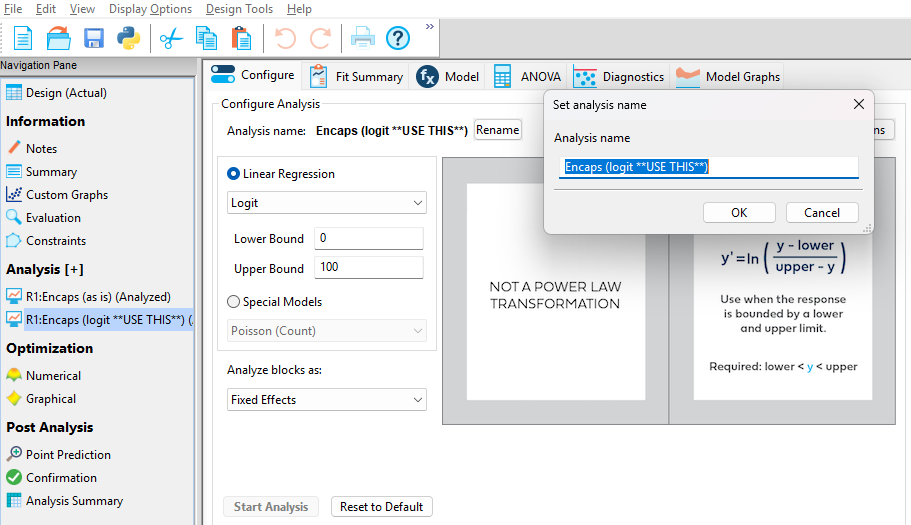
Adding a new model with the logit transformation applied
Then click the Rename button to identify that this new analysis is in the logit scale. If transformations like this prove to be effective (as it did in your case, per your follow-up report), I advise a further renaming to say “**USE THIS**” or something along these lines, thus making it clear which model to apply when doing subsequent numerical optimization.
PS: For details on logit and other transformations, as well as special models, see this Help topic.