
Stat-Ease Blog

Categories
The Peculiar Math Behind Mixture Experiments: A Sugar-Sweetness Case Study
Ever run a mixture experiment where every component looks like a win, only to have the trace plot tell a different story? The following FAQ tackles that exact puzzle — why some ingredients can show a “negative” track in a trace plot even when they contribute positively overall. Stat-Ease consultant Mark Anderson breaks down the mixture-model math behind it using a simple sugar-sweetness example.
Original question from a chemist:
“I completed a mixture screening experiment to assess the effects of 3 components. All ingredients produced positive effects. However, the trace plot contradicts this outcome—several of the components (A, B and C) displaying negative tracks. How can this be?”
Answer from Stat-Ease:
“This is a peculiarity of the mixture models (also known as Scheffé polynomials). I created a similar example on a hypothetical mixture of 3 types of sugar by setting up an equation-only model: R = 1A + 2B + 3C. Then I generated a trace plot showing how the predicted response changes when you increase one component while keeping the ratios of the other components constant.
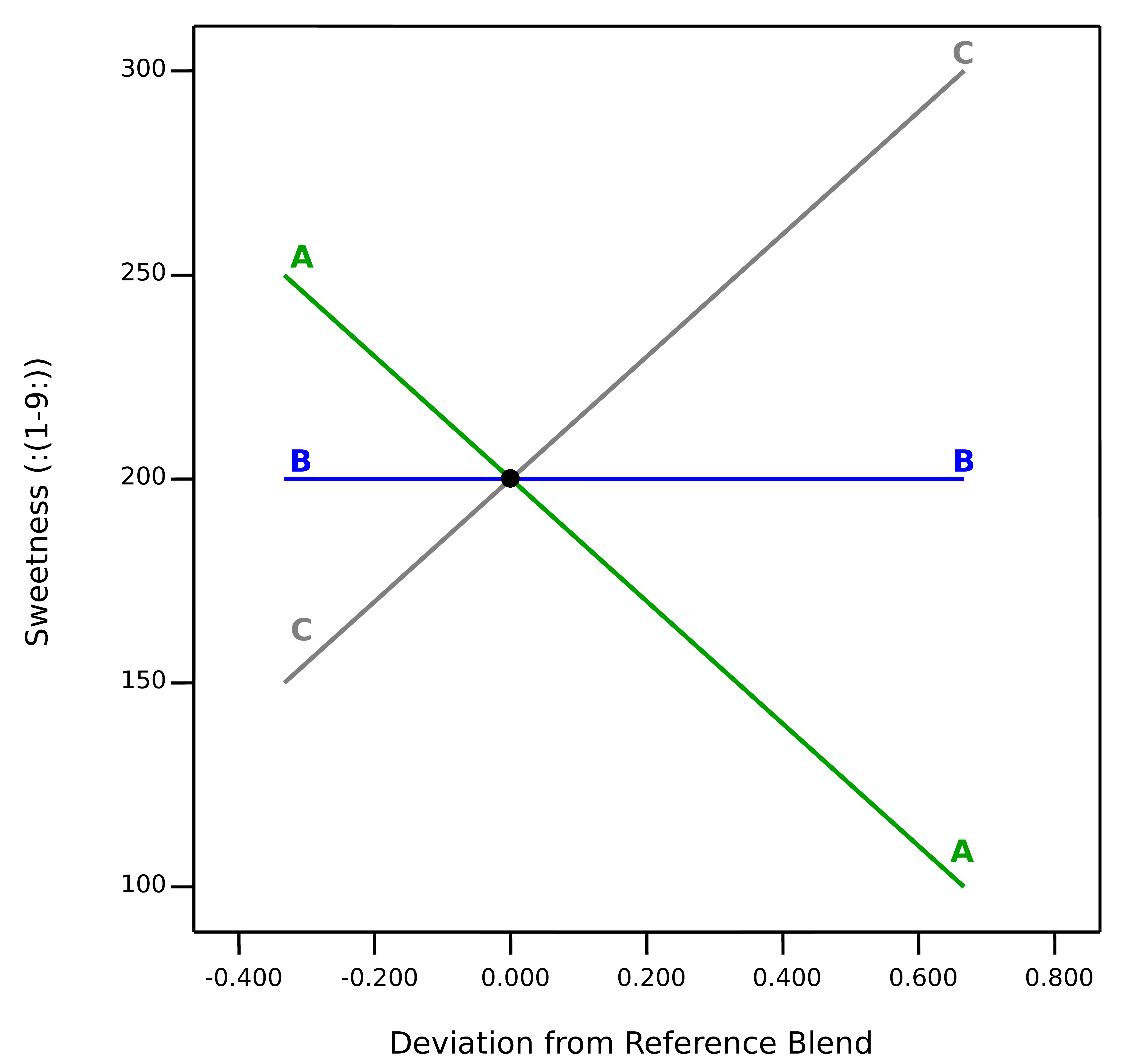
Trace plot from mixture screening experiment
The plot shows the downward impact of A (sugar S1) on sweetness due to it having the lowest coefficient of the three ingredients. This is relative to the other ingredients, adding more of that specific component does not lower the response on its own. Component B (sugar S2) generates a flat track—it’s impact on sweetness is ‘middling.’ The most impactful ingredient is C (sugar S3), as evidenced by its upward track.
For another example showing the trace plot being put to good use, see the November 2024 blog Perfecting pound cake via mixture design for optimal formulation.
How to de-alias a foldover to reveal the true two-factor interactions
This is part 3 of an adaption from Mark Anderson’s 2023 YouTube webinar, "Do's & Don'ts for Screening Process Factors."
Resolution IV designs that detect two-factor interactions
In our training courses, we teach screening using a 9-factor, 20-run example for an arc-welding experiment. This case deploys a Resolution IV Minimum-Run Screening design. The significant effects are shown below:
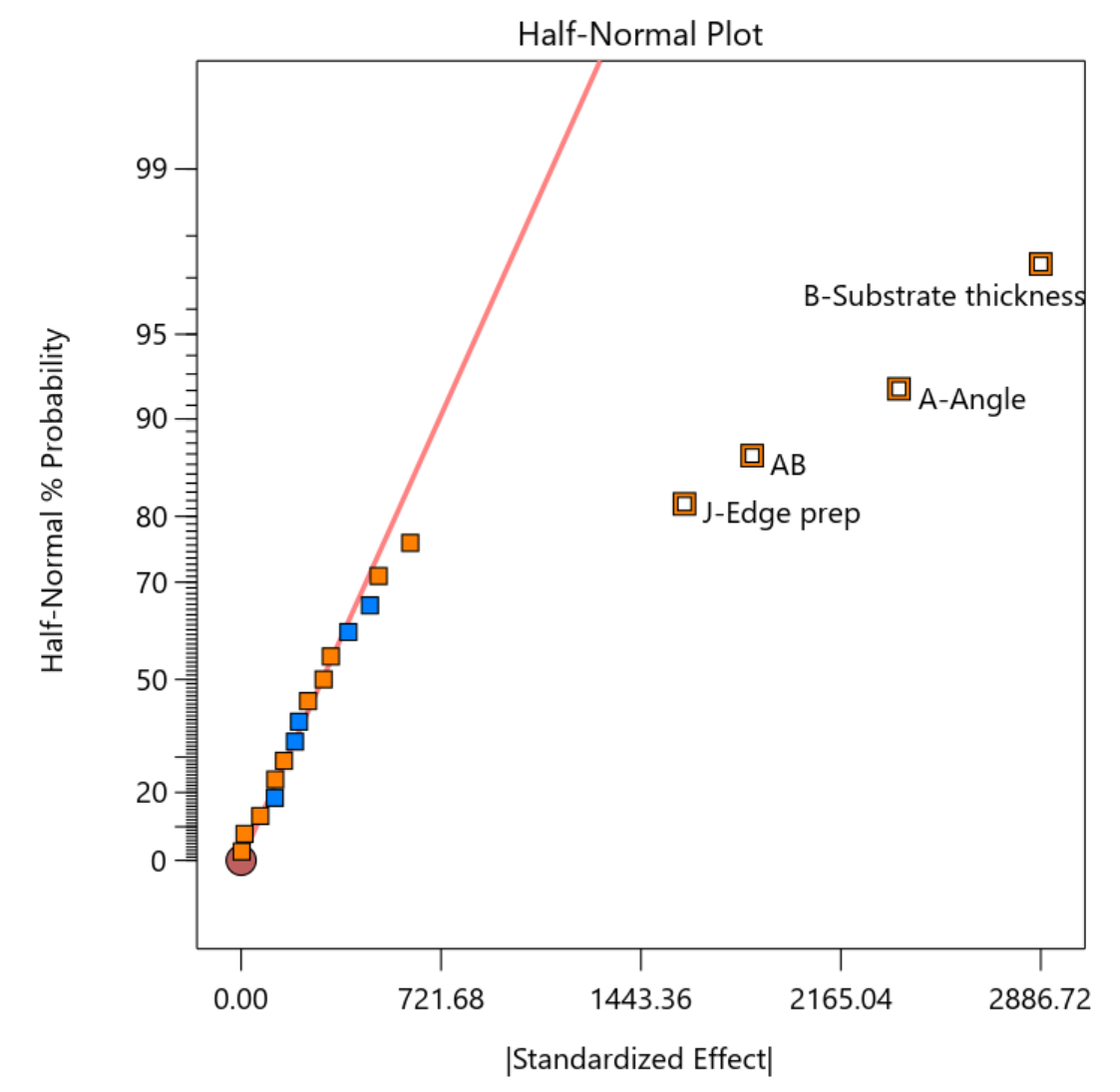
Figure 1: Half-normal plot of effects for arc-welding screening experiment
This experiment reveals a significant two-factor interaction term (AB). The half-normal plot also indicates significance for both parents of AB—factors A and B. A resolution IV design aliases main effects only with three-factor or higher order effects that rarely occur, thus it is save to conclude in this case that factors A and B do indeed create main effects. But you must remain wary about the AB term. Here’s the catch: with resolution IV designs, two-factor interactions are aliased with other two-factor interactions. As shown in Figure 2, in this case, AB is aliased with eight other two-factor interactions.
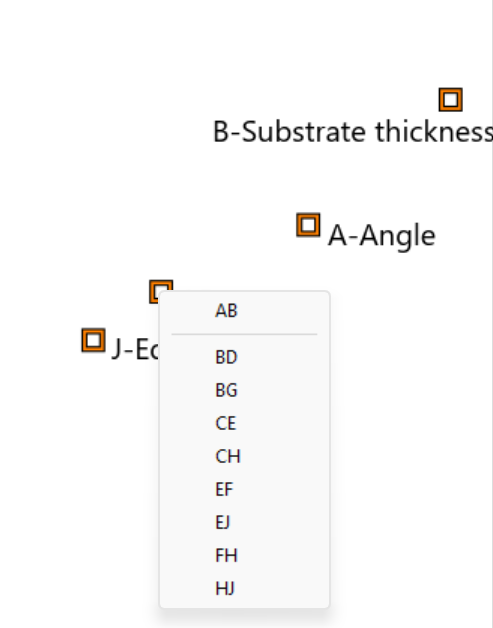
Figure 2: Aliasing of the AB interaction with other two-factor interactions
The reason AB is listed on the half-normal plot instead of the other options is simply because the list is alphabetical. Perhaps it makes sense to the process experts that AB is indeed the proper choice. Or perhaps you feel confident that because both A and B were correctly identified, the interaction between the two is the most logical choice. But it is possible to have an interaction present even when the main effect terms do not show up as significant. Anyone who has ever encountered our software’s hierarchy warning has seen this phenomenon in action.
The consequence of getting this wrong in a screening design is that you may miss factors that are indeed consequential. For example, in the above list if CH was the correct interaction rather than AB, then you would miss carrying C and H forward from the screening design.
You can use a semifold design to validate the AB alias. This will add 50% more runs but will more confidently ensure the likelihood that you’re not missing something important from your screening effort. Figure 3 shows how to do so with Stat-Ease software.
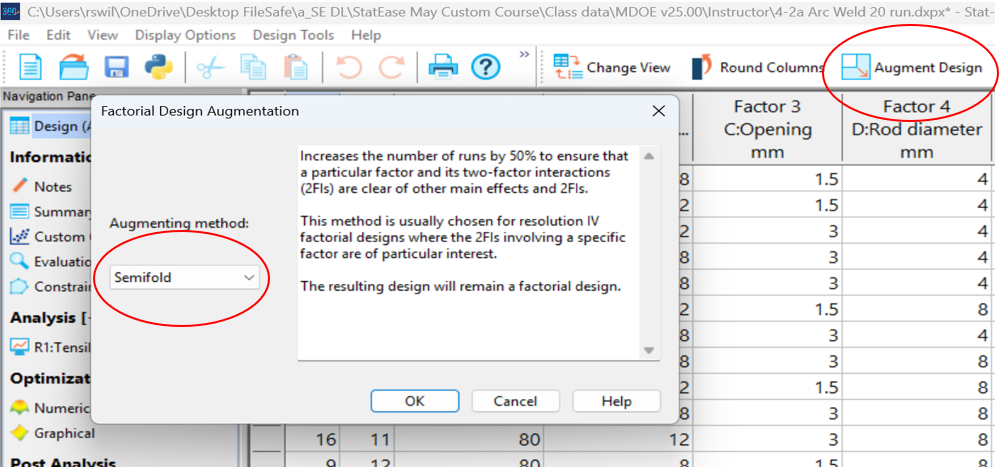
Figure 3: Augmenting a resolution IV design via a semifold
In the next menu, selecting either A or B to fold on will be best given the goal ofresolving the AB interaction. In this case, a good choice will be J+ Edge Prep at the high level), because this factor at the plus setting generated significantly higher tensile strength for the welds. Figure 4 shows these entries in the semifold dialog box.
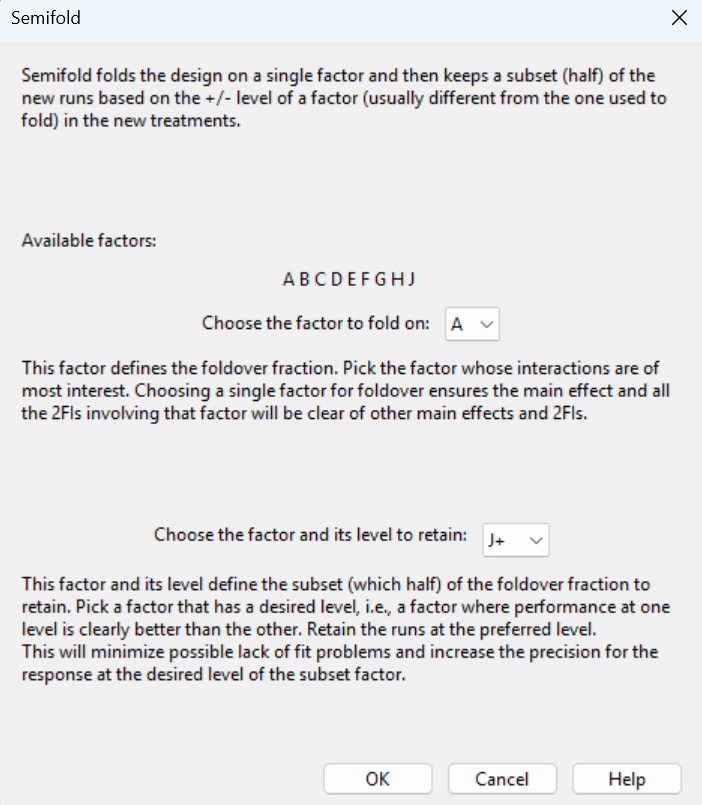
Figure 4: Specifying how to do the semifold
Inspecting the resulting alias structure shown in Figure 5, the semifolded design cleanly identifies not only main effects, but all the two-factor interactions involving factor A, including the AB term of interest.
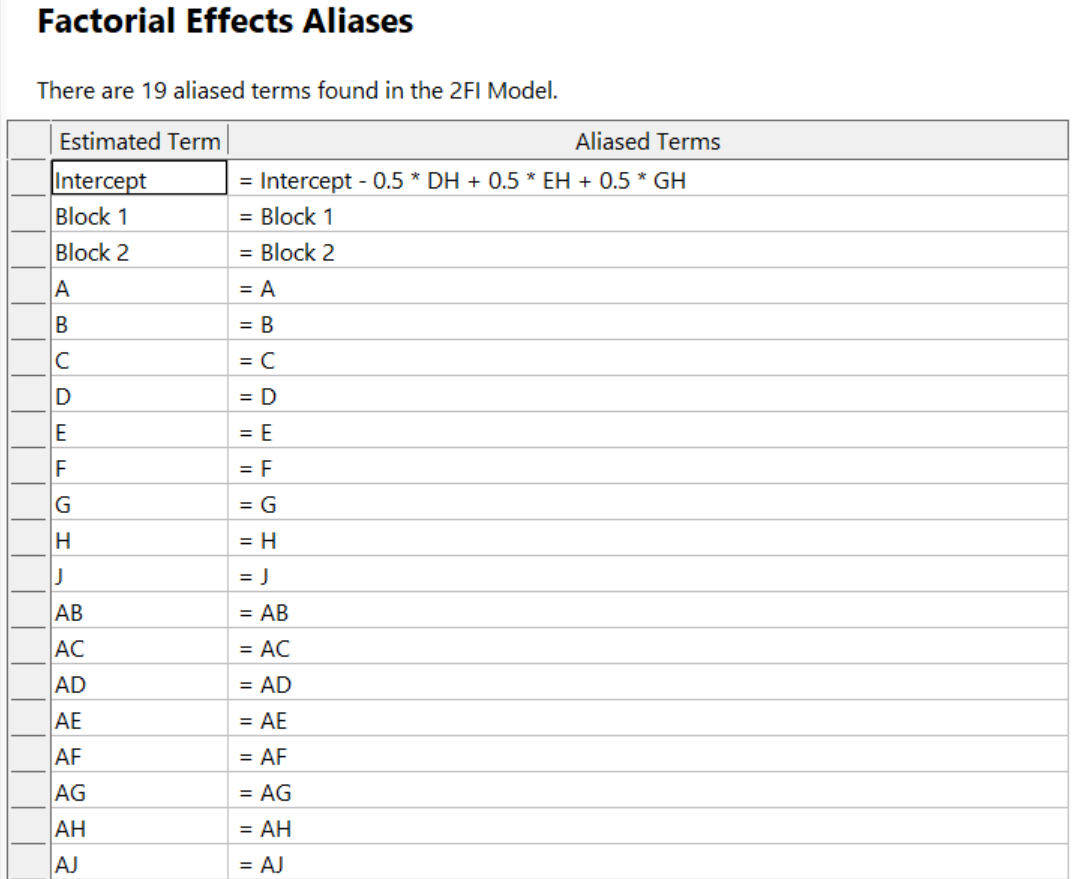
Figure 5: Alias structure after doing the semifold
The semifold increased the original 9 factor, 20 run design to 30 runs. Another option would be to use a resolution V design from the start to ensure all two-factor interactions could be estimated clear of any troublesome aliasing, for example, the minimum-run resolution V characterization design with 46 runs. So, for screening, there is a clear efficiency advantage to using resolution IV designs, even if there is an interaction term worthy of investigating further using a semifold augmentation.
For all DOE’s, it is important to evaluate a design for power–the ability of the design to identify factors impacting responses by a selected magnitude. This is mainly driven by the number of runs. For example. If you’re running a seven-factor resolution IV screening design to look for factor effects of 1.5 standard deviations, you will need at least 19 runs to have acceptable power. The standard geometric resolution IV design has only 16 runs and the minimum run screening design has only 14 runs. Both approaches will require adding a few more runs to satisfy the power requirements.
For fractional factorial designs–especially screening designs–it is also important to evaluate the design for aliasing. The lower the resolution, the more consequential the aliasing. The augmentation approaches discussed in the post can be helpful in addressing tricky aliasing issues that could otherwise limit the success of your screening effort.
When things don't go as planned, whether you've inherited a resolution III design or uncovered a suspicious interaction term, augmentation strategies like the foldover and Semifold offer practical paths forward without starting from scratch. Yes, these repairs cost additional runs, but they cost far less than drawing the wrong conclusions and carrying the wrong factors into your next phase of experimentation. A little upfront diligence in design selection, paired with a willingness to augment when the data demands it, is the surest route to a screening effort that sets your entire experimental program up for success.
The Do's and Don'ts for Screening Process Factors–Solving Alias Challenges
This is part 2 of an adaption from Mark Anderson’s 2023 YouTube webinar, "Do's & Don'ts for Screening Process Factors."
Salvaging a Resolution III design
The first situation is when you violate the advice in our previous blog post and run a resolution III design for screening. Recall that a key assumption for screening is that you anticipate important factors will present a statistically significant main effect. But with a resolution III design, each main effect is aliased with one or more two-factor interactions. So if there are actually interactions present in the system, some or all of the main effects identified will be incorrect. Remember that screening with a resolution IV design keeps us away from this problem by aliasing main effects only with highly unlikely three-factor interactions.
If you didn’t know better and deployed a resolution III design for screening: no worries, resolve the issue by using a foldover design. This design augmentation doubles the original run count in a way that de-aliases the main effects from two factor interactions. The second block of data reverses every factor level (plus to minus and minus to plus) from the original design.
Let’s look at an 11-factor, resolution III, 16-run design for example. The alias structure is shown in Table 1 (interactions involving three factors or more not shown).
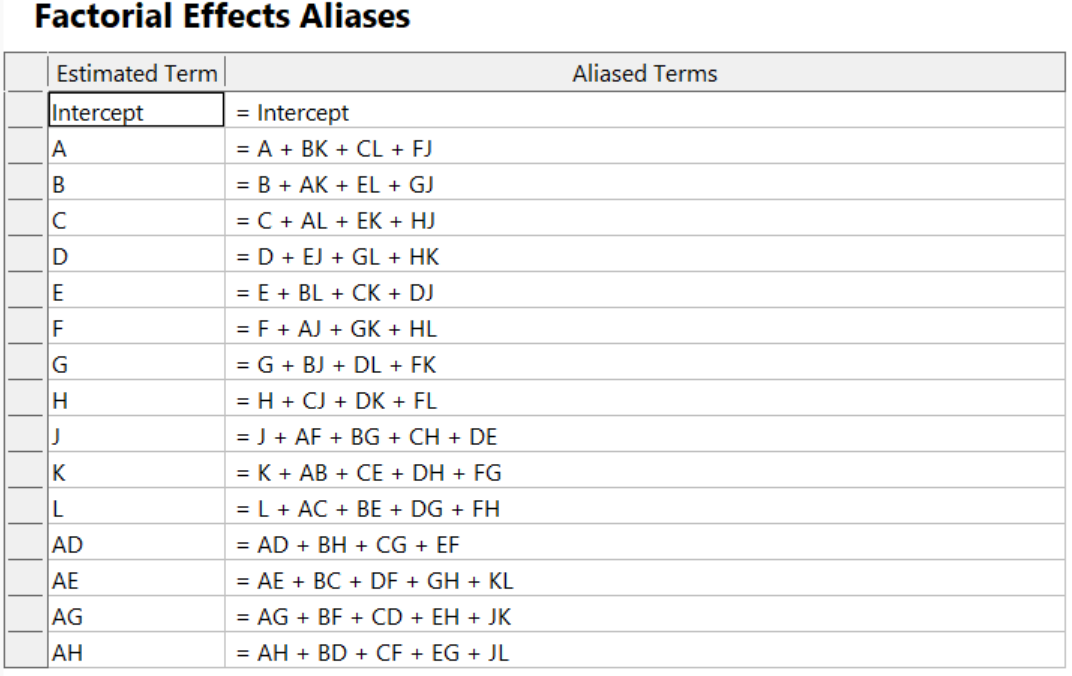
Table 1. Starting alias structure for 11-factor resolution III design
Notice that each main effect is aliased with multiple two-factor interactions.
By augmenting this bad design with a foldover (see Figure 1), you can de-alias the main effects from the two-factor interactions.
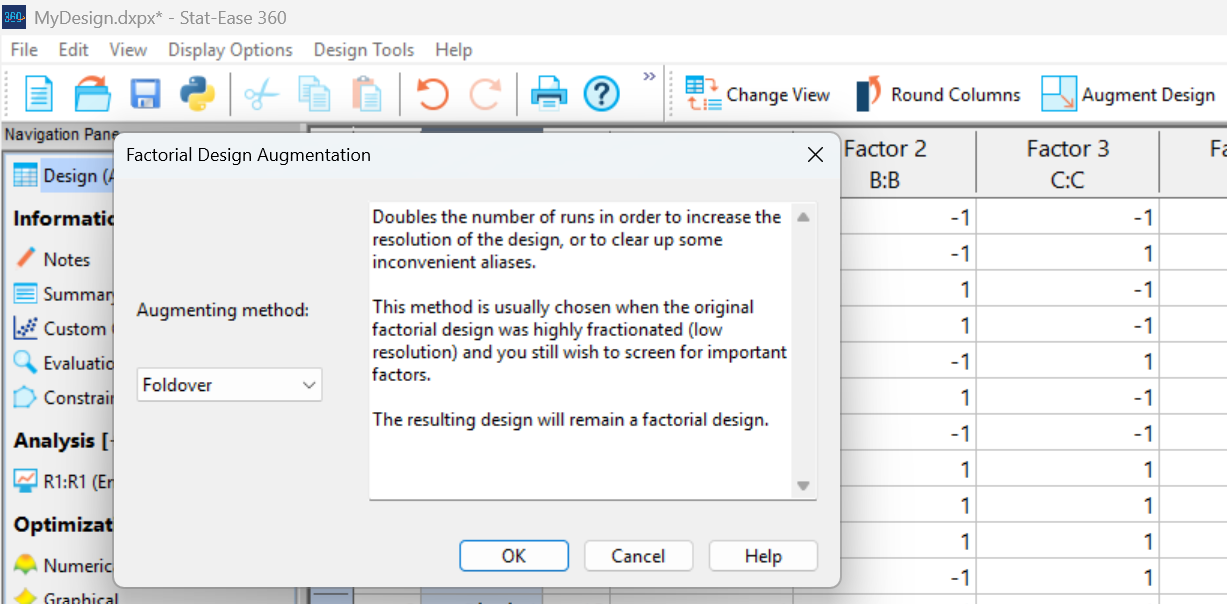
Figure 1: Using Stat-Ease software’s augmentation to do a foldover
The new runs are put in a second block. This structure removes any shift in response that may occur from when you ran the first experiment, such as an increase or decrease due to differing ambient conditions.
Table 2 shows the new, improved, alias structure.
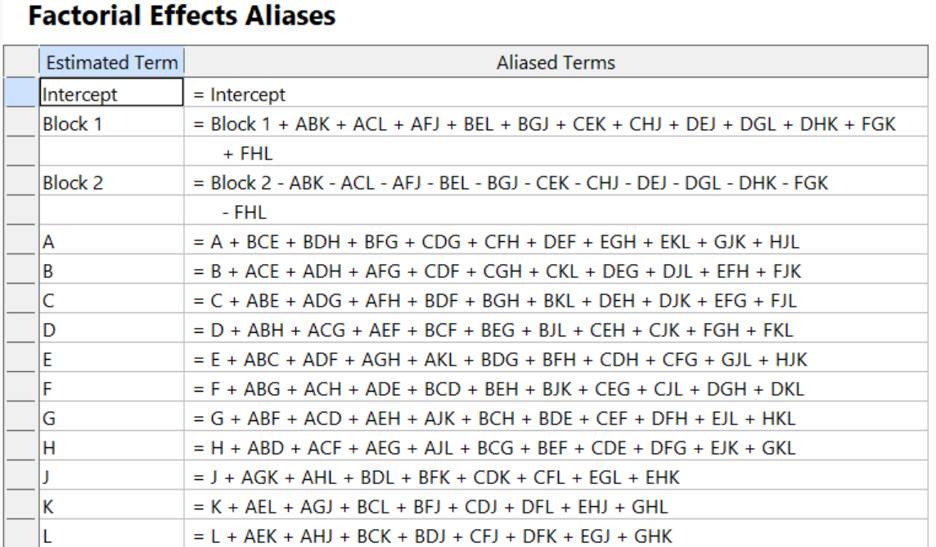
Table 2: Alias structure after the foldover
Note that it took 32 runs to get to the point where it’s confident that the main effects are properly assessed. It would have been far better off to start with a minimum-run screening design for 11 factors, requiring only 24 runs (including 2 runs to bolster it against outliers). However, in our scenario, this would be wishful thinking, since we cannot go back in time. Consider the foldover in this case to be a design repair to achieve the resolution IV needed to safely screen factors down to a vital few for further investigation.
Foldover augmentation also works to de-alias Plackett-Burman designs. Handy!
The Do's and Don'ts for Screening Process Factors
Adapted from Mark Anderson's 2023 webinar, "Do's & Don'ts for Screening Process Factors."
Over the years working with process development engineers on scale-up and manufacturing troubleshooting, we've noticed a pattern: the factors that experts think drive their process are rarely the whole story. There are often other variables at play that nobody anticipates. The best way to uncover these is by using screening designs: broad, shallow experiments that help you uncover previously unknown factors. Done right, a well-designed screening study can transform your understanding of a process and point you directly to the vital few factors worth exploring in depth.
First, let’s make sure we understand what a screening design does in the overall arc of process optimization. Screening designs exist to help ensure we are working with the right factors in subsequent optimization studies. Figure 1 explains the overall strategy. Note that interactions – often the key to process improvement – are not identified until the subsequent step. But a good screening design can shed some light on whether or not there are interactions to further pursue.
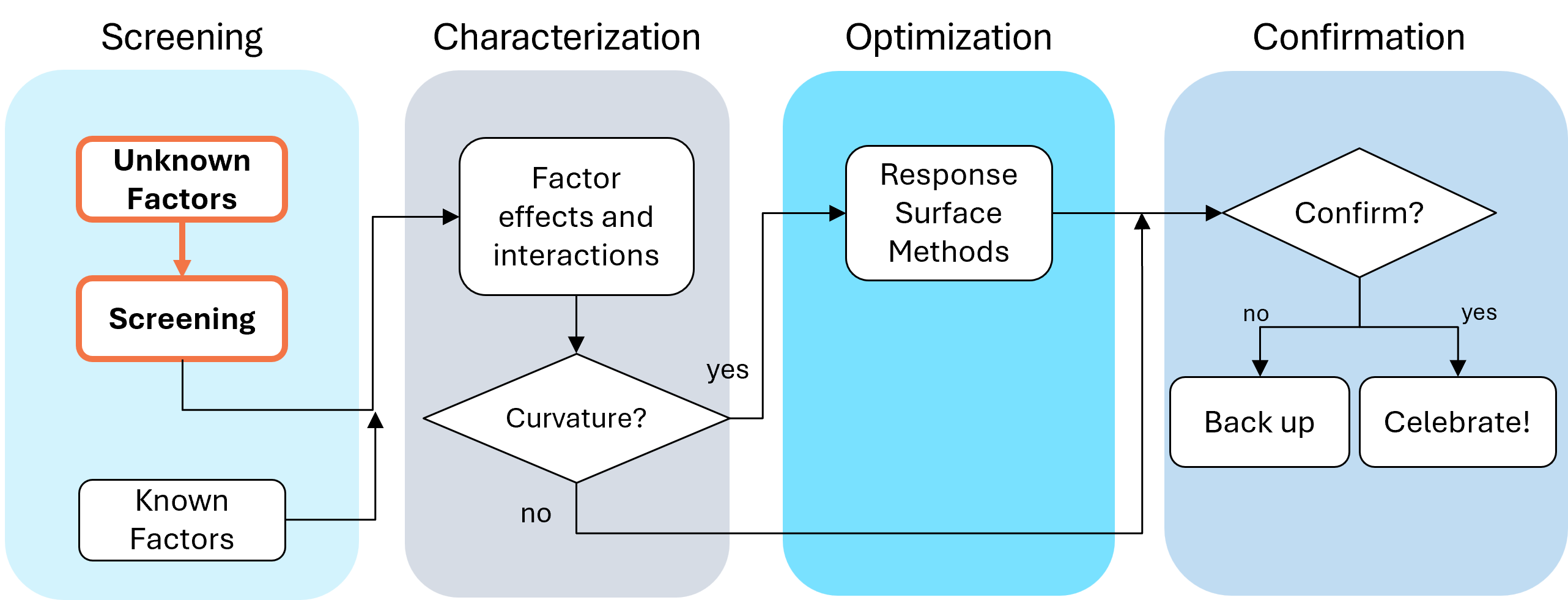
Fig. 1: Where screening fits in the SCOR strategy of experimentation.
With this strategy in view, here are the core do's and don'ts on screening designs. Consider this your field guide for avoiding the most common (and costly) mistakes.
DON'T: Include Factors You Already Know Will Affect the Process
This one surprises a lot of people, and has been the topic of heated discussions within our team. Why would you exclude a known important factor?
The answer is strategic focus and efficiency. By setting known factors aside during screening, you can concentrate on previously unknown factors: ones that might derail your process in unexpected ways. A broad and shallow two-level screening design lets you quickly identify the "vital few" from the "trivial many." In our experience, roughly 20% of factors you didn't expect to matter, matter! The known factors can be merged back in during the next phase of experimentation.
DON'T: Use Low Resolution Designs for Screening
This is our biggest pet peeve. Two types of designs fall into this trap: regular fractional factorials at Resolution III (shown as "red" designs in Stat-Ease software[MA3.1]), which alias main effects directly with two-factor interactions, and Plackett-Burman designs with even worse aliasing. That's a fatal flaw for screening, because if any factors interact (and in real processes, they often do) your main effect estimates are corrupted. You simply cannot trust what the analysis is telling you.
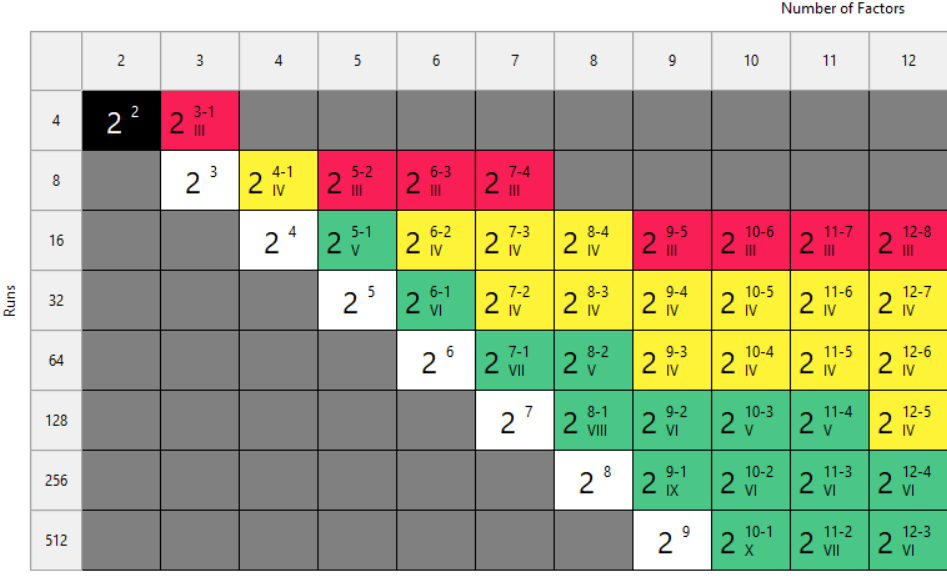
Fig. 2: Stat-Ease software's design picker, color-coded for your convenience.
We're particularly troubled by how often Plackett-Burman designs get recommended for screening. Even the NIST Engineering Statistics Handbook suggests using them, while simultaneously noting that “main effects are in general heavily confounded with two-factor interactions.” To us, that's an oxymoron. If main effects are confounded with two-factor interactions, how exactly is this a screening design? You can’t screen anything out!
To illustrate the danger, we ran a simulation using the classic filtration rate dataset from Doug Montgomery's textbook Design and Analysis of Experiments. The full factorial result was clear: factors A (temperature), C (concentration), and D (stirring rate) were significant, along with strong AC and AD interactions.
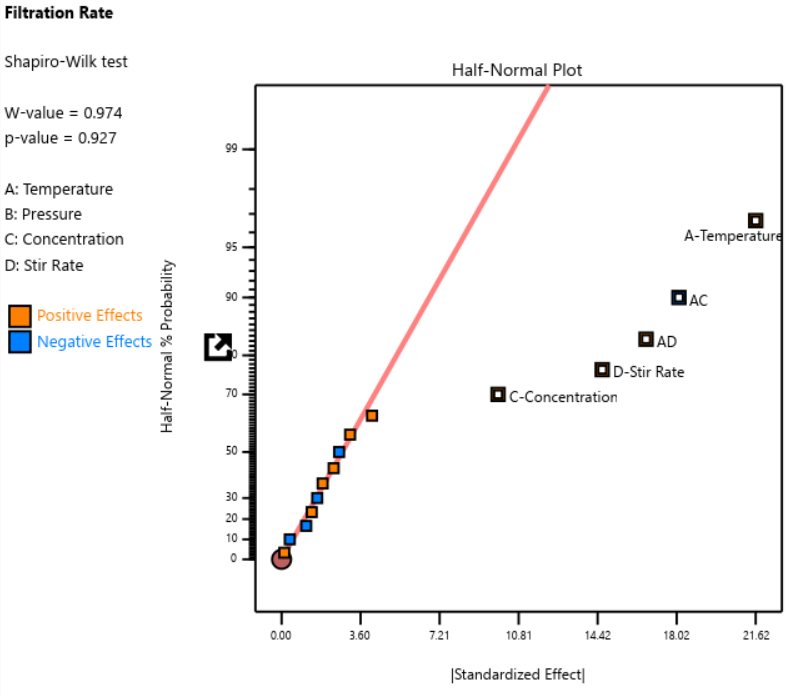
Fig. 3: Half-normal plot of effects for the full factorial design. Note that the selected effects are to well the right of the guideline.
When we re-ran the same underlying model through a 12-run Plackett-Burman simulation, the results were alarming. The AC and AD interactions got “smeared out” across multiple dummy factors. In particular, a fake factor E appeared significant when it was actually picking up aliased pieces of AC and AD. Meanwhile, the real main effect of D was undercut by its aliasing with one-third of AC, causing a cancellation. The result? Only factor A was correctly identified. Factors C and D were missed entirely.
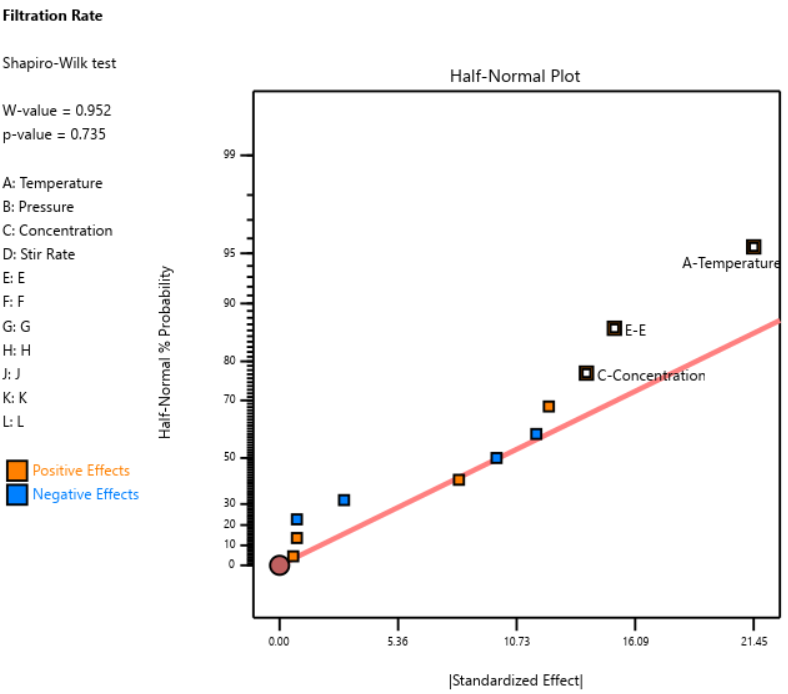
Fig. 4: Half-normal plot of effects for the Plackett-Burman design. None of the effects are to the right of the line, meaning this experiment shows no significant factors or interactions.
DOE pioneer George Box once said that running Resolution III or PB designs are "like kicking the TV to make it work." Sometimes you're desperate enough to try it, but there’s no guarantee you’ll get a usable result.
A Case Study in What NOT to Do
One of our users, a pharmaceutical process developer, sent in his design results hoping we could help salvage them. He had seven factors (time, temperature, and related process variables) and chose a Resolution III design with seven factors in eight runs. This is known as a ‘saturated’ design—the most factors that can be crammed into a given number of runs in a regular fractional factorial. Then, apparently recognizing the power would be low, he replicated the design, giving him 16 runs total, still at Resolution III.
As Ronald Fisher put it, a statistician is more like a pathologist than a medical doctor. We can tell you what killed the patient, but we can't bring it back to life. We wish this researcher had contacted us before running the design. The 16-run Resolution IV option for seven factors was right there in the software, highlighted in yellow (indicating a design more suitable for screening) It would have given him both the power and the resolution he needed. Instead, he replicated a bad design, which is a bit like making a photocopy of a photocopy.
The power calculations for these two designs are the clincher. One replicate of eight runs gave only 50% power to detect his specified signal-to-noise ratio of 1.67. Two replicates (still Resolution III) pushed that to about 87%: good power, terrible resolution. The unreplicated Resolution IV design in 16 runs also reached about 83% power, while giving him a design that could actually distinguish main effects from interactions.
DO: Start with a Resolution IV Design
As stated above, Resolution IV is the “Goldilocks” choice for screening. Main effects are aliased only with three-factor interactions, which are rarely active. That means that any significant main effects detected are almost certainly real. While two-factor interactions in a Res IV design may be murky, you'll know to investigate these further.
In Stat-Ease software, these are the yellow designs in the Regular Two-Level design builder. For up to eight factors, these medium resolution designs work beautifully. For nine or more factors, Stat-Ease’s proprietary, optimally templated, Minimum-Run screening design provides an excellent option when the standard design alternatives get too big.
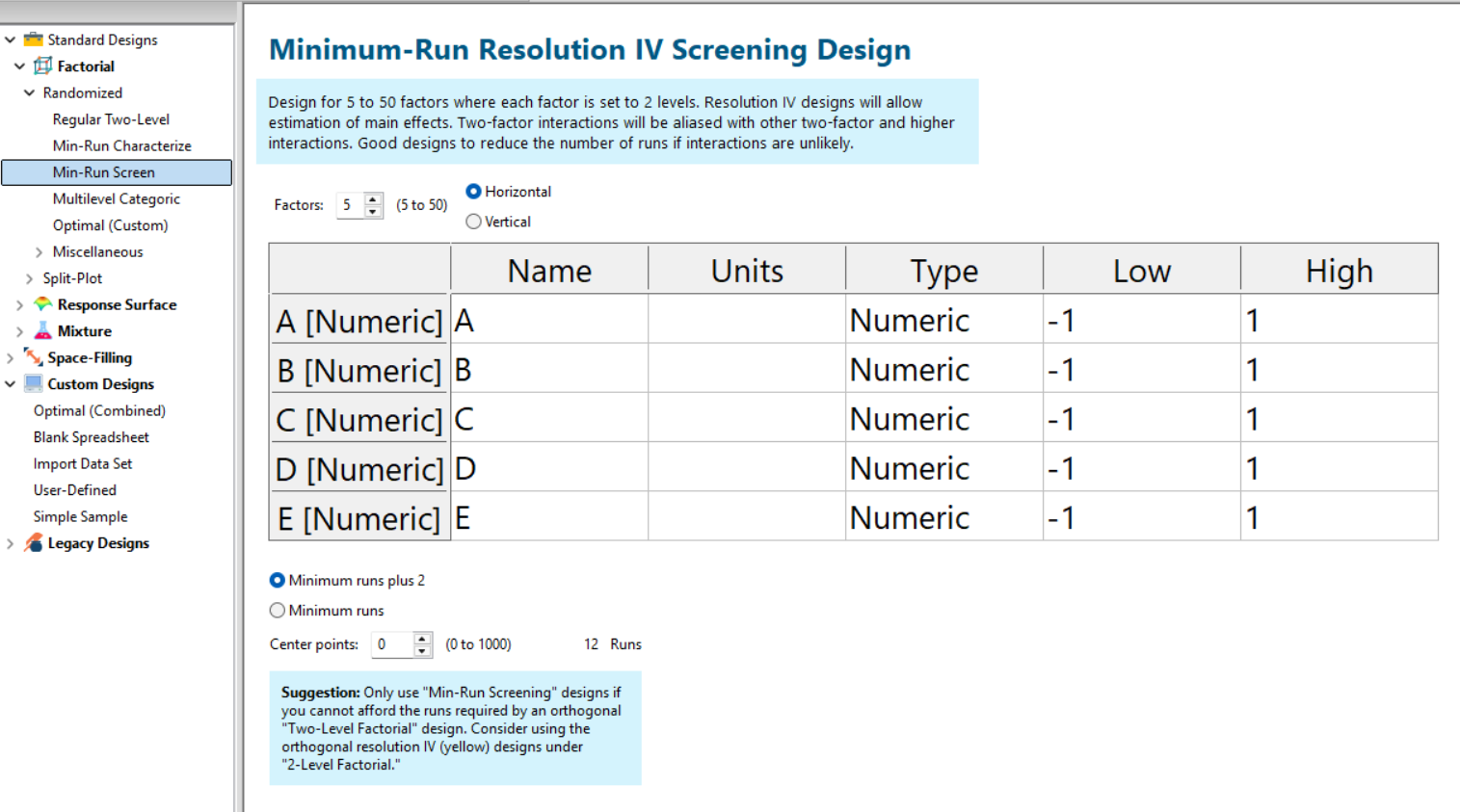
Fig. 5: Min-Run Screening designs in Stat-Ease software. Choose them from the sidebar on the left.
Summary: The Screening Do's and Don'ts
To recap: hold known factors aside during screening and focus on the unknowns. Known factors will be studied together with the survivors of the screening design in the next round of experimentation when characterizing two-factor interactions with high-resolution designs. Avoid low-resolution designs: the red standard ones or Plackett-Burmans. Instead, go with medium Resolution IV or minimum run screening design from the start.
All Stat-Ease software licensees have access to our DOE experts. We encourage you to contact us before making a big mistake in your design of experiments. Don’t hesitate to reach out: do your screening right the first time.
Like the blog? Never miss a post - sign up for our blog post mailing list.
Thinking Outside the Box by Using Standard Error to Constrain Optimization
Response surface methods (RSM) pave the way to the pinnacle of process improvement. However, the central composite design (CCD)—the most common layout for RSM (pictured in Figure 1 for three factors)—traditionally limits the region of prediction to the cubical core. This conservative view avoids dangerous extrapolation out to the far reaches of the space defined by the axial ranges of the star points. This article lays out a less-limiting (but still reasonably safe) approach to optimization based on using a specified standard error (SE) of prediction as the boundary for searching out the optimal process setup.
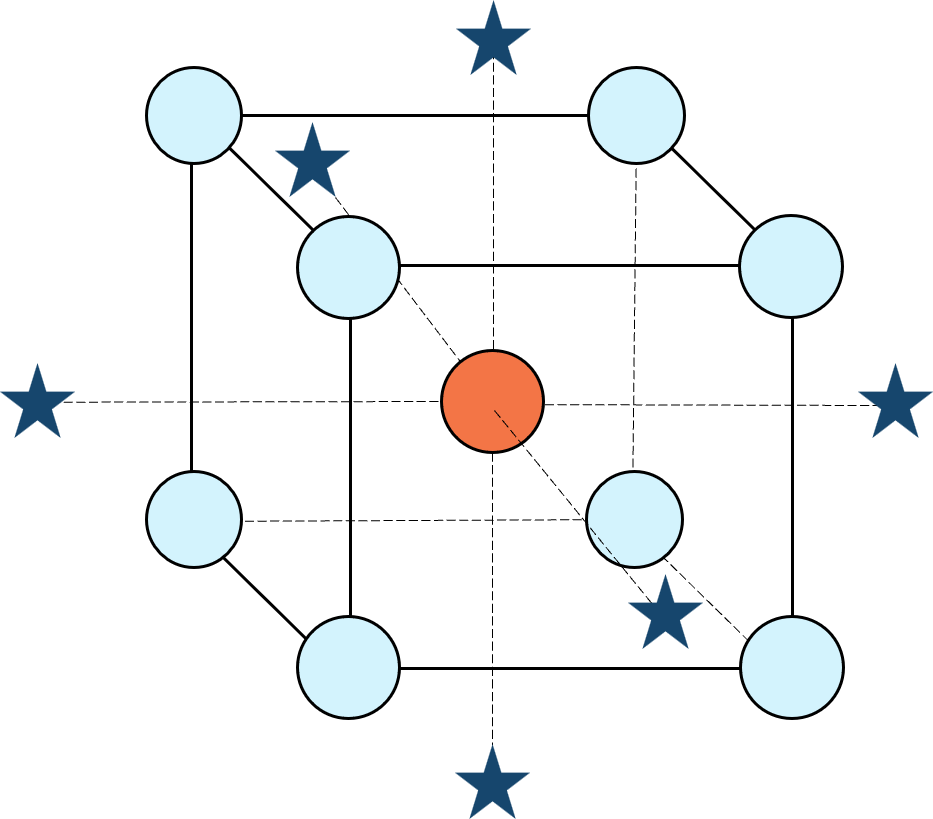
Figure 1: Central composite design for three factors
Three different methods for defining the search area will be detailed for a four-factor CCD. The goal is to avoid extrapolating beyond where the data provides adequate knowledge about the response while maximizing the volume that will be explored.
Let’s compare three boundaries for defining the search area in the factor space, the first two of which do not make use of the SE:
1. Factorial bounded—the hypercube* with vertices at coded values ±1, thus each edge spans 2 coded units. The volume of this four-dimensional hypercube is 16 (=2x2x2x2). The maximum SE is 0.764, which occurs at the vertices (i.e., corners). See figure 2. For comparison’s sake, we will use this SE (0.764) as our benchmark—anything more than this will be deemed unacceptable.
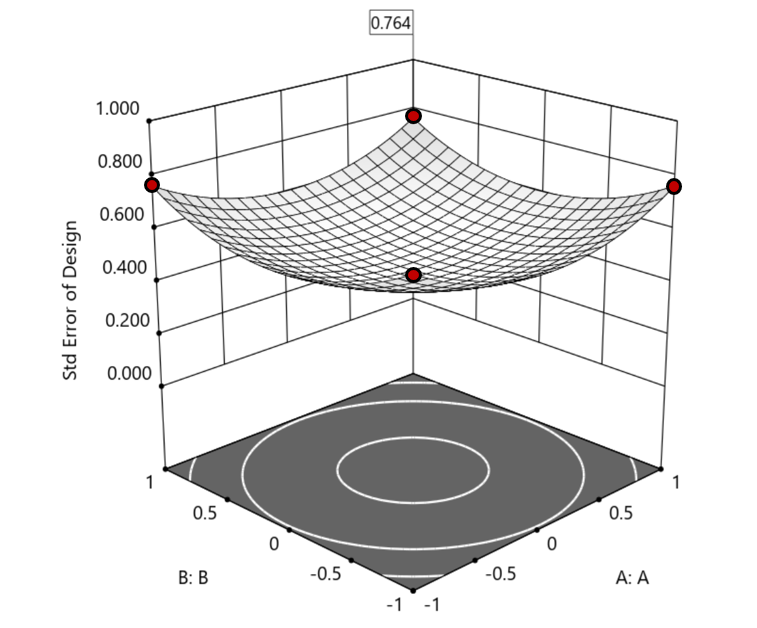
Figure 2. Looking only at the factorial region (±1), with factors C and D set to +1, we see that the highest SE values observed are at the factorial corners.
2. Axial (star-point) bounded—a cube with vertices at ±2 to include the star runs.
The volume of this four-dimensional hypercube is huge: 256 coded units (=4x4x4x4), which offers big advantages for optimization. However, most of the volume (69%) exhibits an SE ≥ 0.764 (maximum is 2.963!). Therefore, this method must be rejected. See figure 3.
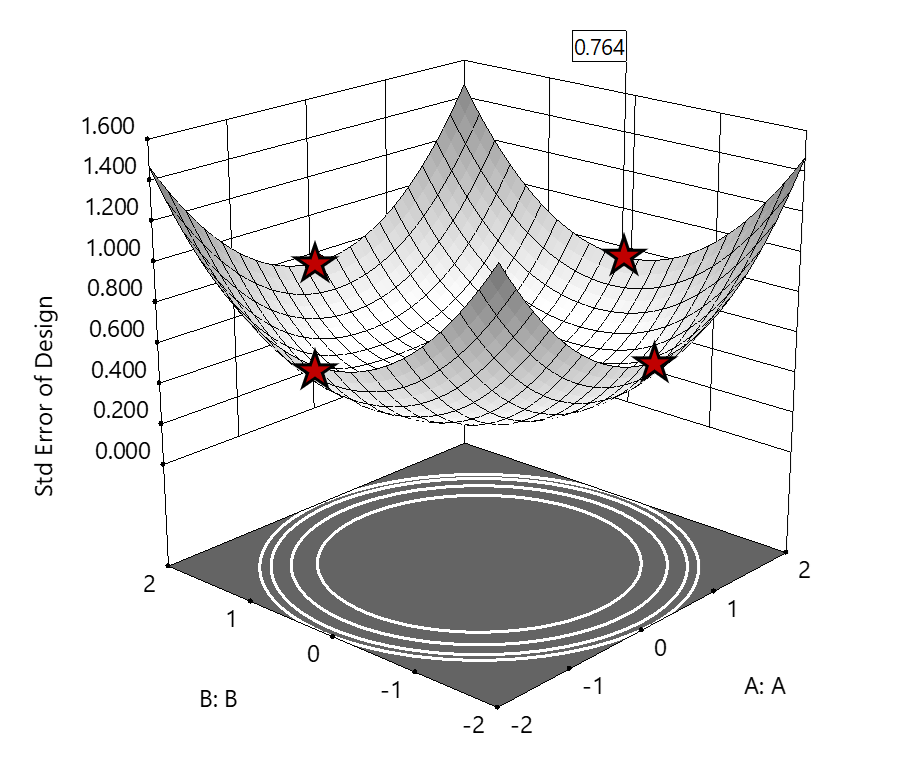
Figure 3. The default axial point placement is at ±2, which for 4 factors creates a rotatable design. The axial points therefore have the same SE as the factorial corner points—all are equidistant from the center. Note that factors C and D are set to zero (center) and the range for factors A and B are increased to ±2 to show the axial points.
3. Standard error bounded—the area within SE ≤0.764.*
Once again looking at figure 3, the SE at the axial (star) points equals that of the ±1 factorial points. Limiting the standard error ≤0.764 produces a hypersphere with a radius of 2. The volume of this hypersphere is 78.96, almost five times larger than the ±1 factorial hypercube.
Summarizing the three methods of defining the search area in the factor space:
- The factorial cube with vertices at ±1 may be too restrictive and may not include all the volume where acceptable predictions could be made.
- A cube with vertices at ±2 that includes the axial runs is too liberal; most of the volume has poor predictions.
- Defining the search area by standard error may prove insightful—it includes all the areas where acceptable predictions may reside.
Using standard error to constrain the optimization defines a search area that matches its properties:
- Spheres for rotatable CCDs. (Note: The above graphics and discussion assumed the choice of alpha values produced a spherical standard error plot).
- Cubes for face-centered CCDs.
- Irregular shapes for central composite designs with alpha between 1 and that recommended for rotatable designs, optimal designs, models for which model reduction was applied, and historical data.
An added bonus to using SE is that it adjusts the search area for reduced models and/or missing data.
It should be noted that it is assumed the design was sized for precision and contains enough data to make sound predictions within the cube (or hypercube). If the FDS is low (for example, below 80%), then making good predictions within the cube is already challenged. Extending the search zone outside the cube would exacerbate things further.
Another caveat is the assumption that a quadratic model pertains outside the design cube. The primary purpose of axial points in a central composite design is to fortify the estimates of quadratic terms to be applied within the cube. Sometimes the specified quadratic model performs well inside the cube, but extrapolation becomes dangerous due to higher-order behavior beyond the faces of the cube. Checking the diagnostic plots for anomalous behavior of the axial points can provide some assurance that the quadratic model is useful beyond the cube.
So, the key takeaway is this. Adding standard error to the search criteria and expanding the factor ranges beyond the edges of the factorial cube can be helpful for making judicious extrapolations beyond the edges of the cube. Simply applying the highest standard error found within the cube to regions outside the cube is a reasonable place to start, especially when the FDS performance of the design is over 80%. It is advisable to treat any interesting discoveries as tentative until verified by confirmation runs, augmented designs, or an entirely new design focused on the projected area of interest.
For more information on how to include standard error in the optimization module, see: Extrapolating a Response Surface Design in the Stat-Ease software Help menu.
*For 3 factors we can envision the factorial design space as a cube. With more than 3 factors (in this case 4 factors) we refer to the analogous region as a hypercube.
Acknowledgement: This post is an update of an article by Pat Whitcomb of the same title, published in the April 2017 STATeaser.
Like the blog? Never miss a post - sign up for our blog post mailing list.